18
Hotel Streaming: Use a Travel Router to Keep Your Accounts Safe

You’re finally at the hotel. The room is nice, the bed looks comfortable, and you just want to unwind with an episode of your favorite show on Netflix or Disney+. You connect your laptop to the free Wi-Fi, open the app, and hit play. Instead of your show, you get a spinning wheel, a buffering icon that never stops, or worse-a message saying "Unable to connect." Or maybe it works, but two days later, you find yourself locked out of your account because the platform flagged your login as suspicious.
This isn't bad luck; it's bad architecture. Hotel Wi-Fi networks are notoriously hostile environments for modern streaming services. They block ports, throttle bandwidth, and force every device through clunky web portals. Trying to stream directly from your phone or laptop on this network is like trying to run a marathon in quicksand. The solution isn't to give up on streaming while traveling. It’s to stop connecting your personal devices directly to the hotel network. Enter the Travel Router, a small, portable networking device that creates its own private Wi-Fi network by piggybacking on the hotel's internet connection.
Why Hotel Wi-Fi Breaks Your Streaming Experience
To fix the problem, you have to understand why hotels hate streaming. It comes down to cost and control. Most hotels provide free basic Wi-Fi, which means they oversubscribe their bandwidth. If hundreds of guests start streaming 4K video simultaneously, the network crashes. To prevent this, IT departments use traffic shaping. They prioritize email and browsing but throttle video traffic. This results in constant buffering even if your speed test shows decent numbers.
Then there are the technical barriers. Hotel networks often use Captive Portals, web pages that require users to agree to terms or enter credentials before accessing the internet. These portals frequently break the handshake protocols used by smart TVs and streaming apps. Furthermore, many hotels isolate clients using Client Isolation (AP Isolation). This prevents your devices from talking to each other. So, if you try to cast from your phone to your laptop, or share files between devices, it simply won’t work because the hotel router blocks local traffic.
Finally, there is the security risk. Public Wi-Fi is rarely encrypted properly. Even if the hotel uses WPA2, the shared password means neighbors can potentially sniff your traffic. When you log into Netflix, Amazon Prime, or Hulu, your session tokens are exposed. Hackers on the same network can hijack these sessions, leading to unauthorized access or triggering fraud detection algorithms that lock your account.
What Exactly Is a Travel Router?
A travel router is not just a smaller version of the box sitting under your TV at home. It is a specialized piece of hardware designed to bridge the gap between public networks and your private devices. Unlike a standard home router, which connects to a modem via Ethernet, a travel router connects to the hotel Wi-Fi wirelessly (or via an Ethernet cable if available) and then broadcasts its own private SSID.
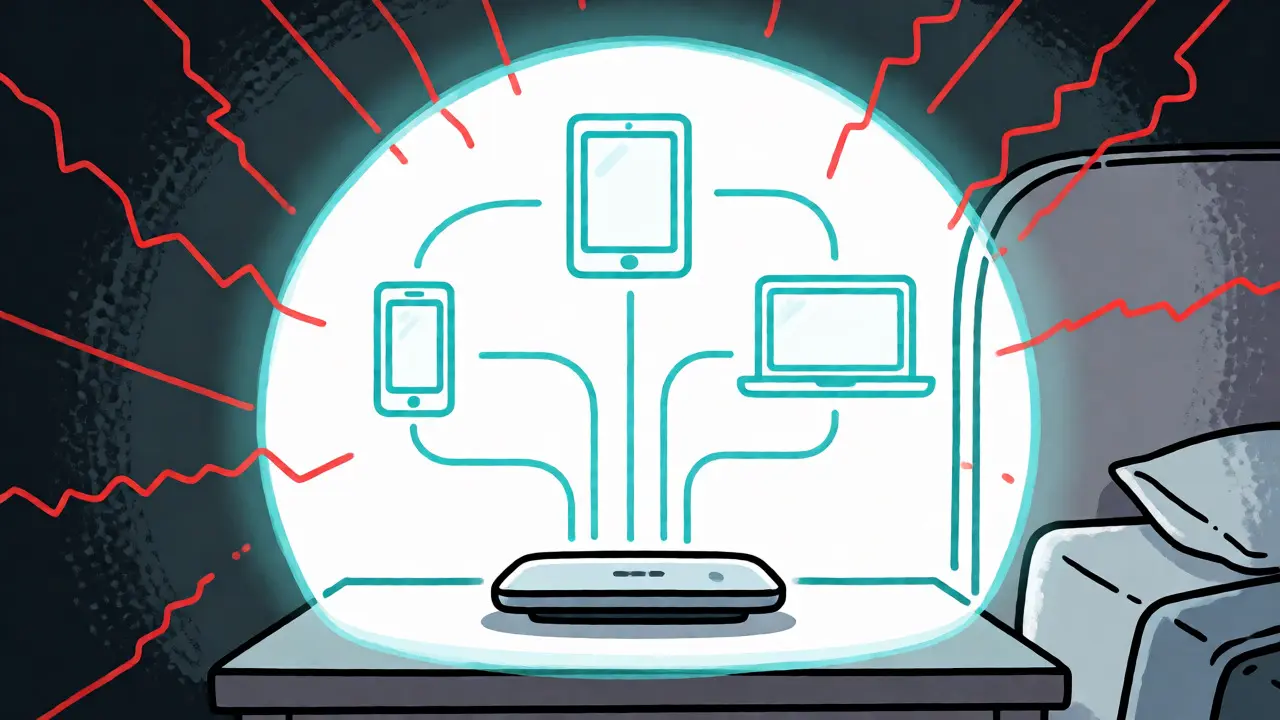
Think of it as a digital bubble. Your laptop, phone, tablet, and any other gadgets connect to the travel router, not the hotel network. The travel router handles all communication with the hotel. To the hotel, it looks like one single device-just a laptop consuming data. But inside your bubble, you have full control over DNS settings, firewall rules, and device isolation.
Key features that make these devices essential include:
- Repeater Mode: Connects to existing Wi-Fi and extends it.
- Access Point Mode: Converts a wired hotel connection into Wi-Fi.
- Captive Portal Bypass: Many models allow you to authenticate once on the router, freeing your devices from repeated login prompts.
- Private DNS Support: Allows you to set custom DNS servers (like Cloudflare or Quad9) to bypass hotel filtering and improve privacy.
The Security Advantage: Why You Need a Private Network
Using a travel router significantly reduces your attack surface. When you connect your phone directly to hotel Wi-Fi, your phone is visible to everyone else on that subnet. With a travel router, your devices sit behind a NAT (Network Address Translation) layer managed by the router. External devices on the hotel network see only the IP address of your travel router, not the individual IPs of your iPhone or MacBook.
This setup also solves the "Double NAT" issue when combined with a VPN. While a VPN encrypts your traffic, it doesn't always solve connectivity issues caused by captive portals. A travel router can handle the captive portal authentication, allowing the VPN tunnel to establish cleanly from your devices. Some advanced routers, like those running OpenWrt or DD-WRT firmware, even allow you to install the VPN client directly on the router. This means every device connected to your travel router-including smart TVs that don't support native VPN apps-is automatically protected.
Consider the scenario where you are working remotely. You need to access internal company servers. Connecting directly to hotel Wi-Fi might expose your credentials to packet sniffers. By routing everything through your travel router, you create a consistent, encrypted tunnel that keeps your professional data separate from the chaotic public airwaves.
Choosing the Right Travel Router for Streaming
Not all travel routers are created equal. For streaming, you need specific capabilities. Cheap USB dongles often lack the processing power to handle high-bandwidth video streams without overheating or dropping connections. Here is what you should look for:
| Feature | Basic USB Adapter | Dedicated Travel Router | Smartphone Hotspot |
|---|---|---|---|
| Bandwidth Handling | Poor; struggles with HD/4K | Excellent; supports dual/tri-band | Variable; depends on cellular signal |
| Captive Portal Handling | Often fails or requires manual refresh | Automated bypass options available | N/A (uses cellular) |
| Device Limit | 1-3 devices | 10+ devices comfortably | 5-10 devices (drains battery) |
| Privacy Control | Minimal | Full firewall/DNS control | Carrier dependent |
| Cost | $15-$30 | $50-$150 | Data plan costs |
For serious streamers, look for routers that support Wi-Fi 6 (802.11ax). This standard offers better efficiency in crowded environments, which is exactly what a hotel lobby or conference center is. Brands like GL.iNet, TP-Link, and ASUS offer compact models specifically designed for travelers. Ensure the model has an Ethernet port; sometimes, plugging into the wall jack in your hotel room provides a much more stable connection than fighting for wireless bandwidth.
Step-by-Step Setup Guide
Setting up a travel router takes about ten minutes. Once configured, it becomes second nature. Here is how to get your streaming back on track:
- Power Up: Plug the travel router into a power outlet. Wait for it to boot up completely.
- Connect Admin Device: On your laptop or phone, connect to the default Wi-Fi network broadcast by the travel router (check the sticker on the bottom for the name and password).
- Access Admin Panel: Open a browser and type the admin IP address (usually 192.168.8.1 or similar) into the address bar.
- Select Repeater Mode: Navigate to the setup wizard and choose "Repeater" or "Client Mode." This tells the router to scan for nearby Wi-Fi networks.
- Scan and Connect: Select the hotel’s Wi-Fi network from the list. Enter the hotel password if required. If there is a captive portal, the router may prompt you to open a browser window to accept terms. Do this now.
- Configure Your Own SSID: Set a unique name and password for your private network. This ensures your devices know which network is yours.
- Set Custom DNS (Optional): In the network settings, change the DNS servers to 1.1.1.1 (Cloudflare) or 8.8.8.8 (Google). This helps bypass some hotel-level content filters and speeds up resolution times.
- Connect Your Devices: Disconnect your laptop and phone from the hotel Wi-Fi. Connect them to your new travel router SSID.
Once connected, test a streaming service. You should notice immediate improvements in stability. If you still face issues, check if the hotel blocks specific ports. Most streaming services use standard HTTP/HTTPS ports (80/443), but some peer-to-peer based services might struggle. Stick to major platforms like Netflix, Hulu, or YouTube, which are generally resilient.

Troubleshooting Common Issues
Even with a good router, glitches happen. If your stream buffers heavily, check the signal strength between the hotel router and your travel router. Move your travel router closer to the ceiling or away from metal objects. Walls are great for privacy but terrible for Wi-Fi signals.
If you get an "Internet Not Connected" error, it is likely a captive portal timeout. Hotels often disconnect idle devices after 15-30 minutes. Some travel routers have a "Keep Alive" feature that sends small packets periodically to maintain the connection. Enable this if available.
Another common issue is IP conflicts. If both the hotel network and your travel router use the same subnet (e.g., 192.168.1.x), you will experience routing errors. Most modern travel routers automatically detect this and shift their subnet (e.g., to 192.168.2.x), but double-check your LAN settings if things act strangely.
Frequently Asked Questions
Do I really need a travel router if I have a VPN?
Yes, they serve different purposes. A VPN encrypts your data and masks your location, but it does not solve connectivity issues caused by captive portals or client isolation. A travel router manages the network connection itself, handling the login process and creating a private subnet. Using both together provides the best security and reliability.
Will a travel router slow down my internet speed?
Slightly, yes. There is a small overhead involved in repeating the signal. However, this loss is usually negligible compared to the benefits of stability and bypassing hotel throttling. In many cases, you will actually experience faster load times because the router maintains a persistent connection, avoiding the frequent re-authentication drops common on direct hotel connections.
Can I use my smartphone hotspot instead of a travel router?
You can, but it drains your phone battery rapidly and limits your data usage. Hotel Wi-Fi is usually unlimited, whereas mobile data caps can be restrictive for streaming. Additionally, phone hotspots often struggle with multiple simultaneous high-bandwidth connections compared to dedicated hardware.
How do I handle hotels that charge for premium Wi-Fi?
If you pay for premium Wi-Fi, the travel router setup remains the same. Connect the router to the premium network during the repeater setup phase. The benefit here is that you only need to pay for one device's access, rather than paying per device or struggling to register multiple MAC addresses on the billing portal.
Is it safe to use public Wi-Fi for banking without a travel router?
It is risky. Without a travel router creating a private NAT layer, your device is more exposed to man-in-the-middle attacks. While HTTPS protects your password, session hijacking is still possible. A travel router adds a layer of obscurity and control, making it significantly safer for sensitive tasks.